
Tools you can use to find and cut waste in your home
Home energy saving devices could be anything that saves you energy in the home, from an energy efficient fluorescent light or LED house light to an ENERGY STAR washer or dryer. What we’ll talk about here are devices whose chief purpose is to help you measure, or make better use of, energy in your home.
In this article I’m going to focus only on four types of energy saving devices:
- Meters and monitors: Devices that are for monitoring home energy use, so that you can make intelligent choices about where you can find savings
- Indirect energy saving devices: Devices intended for a particular use whose indirect result is to save energy, for example, a light dimmer switch
- Direct home energy saving devices: Devices whose only purpose is to save energy, either for a particular purpose or for your entire house
- Bogus energy saving devices: Devices marketed as home energy saving devices, that really don’t save you much, or any, energy, or that won’t save you nearly as much, for the amount spent, as following other home energy efficiency tips such as those provided throughout this website.
If the home energy saving device you’re looking for is a washer, dryer, fridge, freezer, or other appliance, see the household link on the left. Likewise, for home energy saving devices such as energy efficient lighting, heating and cooling options, I have whole sections on each of these. Just follow the links to the left.
Meters and monitors
I’m a firm believer in measurement; if you don’t measure how much energy you’re using, you won’t know how much you can save, or how much you have already saved.
Let’s look at some important meters and monitors you can use
as home energy saving devices:
-
- Thermometers: A thermometer is one of the simplest and most effective home energy saving devices. It can save energy by helping you measure the temperature of refrigerators and freezers and adjust to a more energy efficient (or health-safe) temperature. A thermometer can also help you find poorly insulated areas of your house. More on this below.
- Electrical meter and gas meter: You thought your meter was just for measuring! In fact, it’s a great home energy saving device! Reading your electrical and gas meter on a regular basis, and logging the results in a spreadsheet, is a great way to get a clearer picture of your energy usage. When you start seeing daily readings fall, you know you’re doing something right in your energy saving efforts. When they spike back up, you know something new has been introduced, or some old energy wasting habit, once brought under control, is now costing you money again.
- Plug-in electricity monitors: Home energy saving devices such as the Kill A Watt meter and Watts Up meter are electricity energy monitors that help you figure out which devices are costing you a lot of electricity, and which ones you don’t need to worry about. I describe these devices in more detail, including my own experience with one of the most popular models, on my Kill A Watt page; this electricity energy monitor has saved me hundreds if not thousands of dollars since I started using it.
- Full-house electricity monitors: Home energy saving devices such as the PowerCost Monitor and The Energy Detective (TED) are electricity energy monitors for whole house energy usage, so you can watch usage change as various devices are switched on and off. This can be helpful identifying the power usage of devices that can’t easily be measured by a plug-in electricity energy monitor, such as an electric stove, air conditioning unit, or a device where the plug is hard to get to (such as a refrigerator). Full-house electricity energy monitors can also help you gauge the overall level of phantom load in your house: if you think everything is switched off and your fridge isn’t running, how many watts you are burning will tell you how much phantom load you have. But they do not give as clear an indication of how much a particular device uses.
- Infrared heat guns: these devices can give you an instant temperature reading for any area you point and press the trigger at. A great way to get a quick handle on where heat is escaping from your house in winter or leaking in on hot summer days. My page on these thermal leak detectors provides full details on available features and how to use them.
Thermometers as home energy saving devices
Let me elaborate on how you can use a thermometer (such as the La Cross Scientific Wireless Indoor Outdoor Thermometer shown here, available from Amazon.com) as a home energy saving device. I especially recommend a digital thermometer with a remote probe, one where the thermometer includes either a remote wireless probe or one connected to the display unit by a wire. Ideally the thermometer should also have minimum and maximum remembered readings. Here are some great ways to use such a thermometer as a home energy saving device:
Save on refrigeration: If your refrigerator or freezer temperature is set too high, you can lose food to spoilage, which is a waste of the energy used to grow and transport the food to you. If the temperature is set too low, you’re using more electricity to cool your food than is necessary. You should measure your refrigerator and freezer temperatures at least a couple of times a year, preferably more often if there are little hands in the house who might ‘accidentally on purpose’ turn the temperature controls.
To measure your refrigerator or freezer temperature, place the remote probe inside a jar 3/4 full of water. Leave the jar inside the refrigerator or freezer, at least one hour for the refrigerator, at least 6 hours for the freezer. Once this period has passed, reset the thermometer’s minimum and maximum temperatures. Then wait a few more hours. Take a reading of the minimum and maximum, and take the halfway point as the likely average temperature of the refrigerator or freezer. If that halfway point is colder than required, turn the temperature control dial up a notch. If it’s warmer than required, turn the control down a notch. Then reset the minimum and maximum, wait a few more hours, and try again.
It’s best to avoid a lot of opening and closing of the refrigerator/freezer door when doing this, as you will distort the readings somewhat, but the jar 3/4 filled with water is designed to mask out sudden fluctuations caused by the door being opened.
Make sure the jar is no more than 3/4 filled for the freezer test, so that the expanding water doesn’t crack the jar!
Save on hot water: Use your thermometer as a home energy saving device to measure the hot water temperature coming out of your tap. Turn the hot water temperature down on your heater if the temperature is above 49C or 120F.
If you install an insulating blanket around your hot water heater, you can use the thermometer to assess how effective the blanket is. A large difference in temperature reading between the space between the heater and the insulating blanket (reading A) and the outside of the insulating blanket (reading B) will tell you that the blanket is really helping you save. A small difference means the blanket isn’t accomplishing much.
Find insulation gaps: If you don’t mind taping your remote probe to the drywall or plaster of your outside walls and the glass on windows, you can measure the temperature of walls on a cold day when the heat is on, to determine where heat loss occurs most quickly. In a properly heated room, colder sections of wall usually indicate that there is less insulation behind them. You can take readings on several windows and compare the results; lower readings on a particular window may mean that window lacks the energy efficient reflective coating of other windows in your house, or, if it is a double- or triple-pane window that is supposed to be filled with an insulating gas such as argon, that the insulating gas has leaked out.
Note that you can use an infrared heat gun to find insulation gaps much more quickly than the method described here: just point at an area of your wall, press the trigger, and you’ll have a reading. The technique described here is one I devised before I learned of point-and-shoot thermal leak detectors. It works, but since you can buy an infrared heat gun for under $50 most people will probably find this technique with a remote probe thermometer a bit convoluted.
Indirect home energy saving devices
Some home energy saving devices were designed for another purpose, but indirectly they help you save energy. An obvious example of an indirect home energy saving device is a dimmer switch. Dimmer switches let you produce a softer lighting effect in a room, but when you dim the lights, you’re also using less energy. (Just don’t dim them so much that you forget the light is on; you could wind up leaving the lights on for many hours at a lower power setting, which is still worse than turning them off!)
Here are some indirect home energy saving devices that can put a dent in your energy bill:
Dimmer switches can be used for both lighting and fans. A dimmer that works with incandescent or halogen lights can also be used to lower the speed of a fan motor, if you want a little airflow out of a bathroom but not the full blast. For fluorescent lights, make sure you use either a dimmer that is designed for them, or fluorescent lights that are designed to work with an incandescent dimmer.
How much energy do you save with a dimmer switch? For incandescent light bulbs, the rule of thumb is that for every 10% dimming from full light, you’ll save 5% of the electricity. So the savings aren’t that substantial. If you have 300 watts worth of halogen lights in your kitchen and you dim them by 10%, you’re only really saving 15 watts of power. A better solution is not to install so many halogen lights!
Automatic timers: When you put a device on a timer, you may save energy. An obvious example of an automatic timer as a home energy saving device is a pool pump, which uses a lot of energy and normally doesn’t need to be on all day long; by setting it on a timer so it’s only on a few hours each day, you’ll save a bundle. You can also put your computer accessories power bar on a timer and set it to turn off when you’re either asleep or normally out of the house.
Timer switches are light or fan switches that can either run for a range of preset times (30, 15, 10, 5 minutes for example), or have a dial that can be set to any range of minutes. These home energy saving devices are great for things like bathroom fans, which you may want to run for some time after you leave the bathroom, but which you don’t want to run all day. This can save you not only the energy used to run the fan (which is pretty minimal) but the energy lost when you pump warm air outside in winter, or cold air outside when the air conditioning is on. The two switches shown at right (available from Amazon.com) can be used for motors such as bathroom exhaust fans (up to 20 amp), incandescent, halogen, or fluorescent lights. A version with 60-30-20-10 is also available.
Motion- or infrared-activated switches are light switches that sense movement or the body heat of a person entering a room, and turn the current on when you pass the sensor, then turn it off after the movement or heat is no longer detected. These can be home energy saving devices, if they are used, for example, to prevent a light from being left on. However, when used for security lighting, they can waste energy, as they tend to go on unnecessarily when triggered by a falling leaf or a passing racoon.
If you want the convenience of being able to switch a light on, but having the light turn off automatically if you forget to switch it off, try a screw-in motion-sensor switch. This works well for a lamp (provided it has a tall enough shade) or for a bare ceiling fixture, such as in a laundry room, furnace room, or workroom. Remember though that the motion sensor does draw a small current continuously, so if it’s a room you only go in a few times a year, adding the sensor might actually increase the amount of electricity the light uses over its life. (Remember: If you leave the switch off, it uses no eletricity, but if you forget it on for a week because you rarely go into the room, you are using that ghost load for the whole weak.)
Power bars can be great home energy saving devices if you’re disciplined about turning them off when the devices attached to them are not in use. Computers and accessories can use a fair bit of power; a power bar with built-in surge protection not only protects your equipment from damaging power spikes, but also cuts all power to the devices when you turn it off. (Smart power bars, which detect when attached devices are in standby or phantom load mode, are examples of direct home energy saving devices, and are discussed below.)
Home automation systems are designed for people who like gadgets and want complete control of their home through a console, a program running on their PC, or even remotely by telephone. While I suspect that overall these systems result in more energy being consumed (since part of the intent is to use the home automation system to create the illusion that people are at home when they’re not, to fool thieves), if they are used with the express purpose of cutting energy use they may fairly be considered home energy saving devices. Certainly the ability to connect to your home thermostat from a telephone, and turn the heat on, would allow you to leave for an open-ended holiday and still be able to return to a warm house. (But does this save energy? Wouldn’t leaving the heat on low for the whole time, and then turning it up just when you got home, save more energy? For just an hour of cold discomfort in your home while the furnace kicks in?)
Direct home energy saving devices
Here are some home energy saving devices that are specifically designed to save you energy, and that work well for that purpose:
- Programmable thermostats
- Standby-detection devices, which cut power to a device when it enters standby
- Thermally controlled switches that turn power on or off based on a temperature range
- Air conditioner energy saving devices
Programmable thermostats
According to the Energy Efficiency and Renewable Energy agency of the US government, you can save up to 1% of your energy costs for every degree Fahrenheit that you turn down the heat, or turn up the air conditioning, for an 8 hour period each day.In other words, if you normally keep your house at 68F, but you change your habits, and start turning the temperature down to 61F from 11am to 7am every day, you can cut your heating costs by 7% (68 – 61 = 7). If you do the same for air conditioning, and raise the nighttime temperature for 8 hours from 78F to 82F (a 4 degree spread) you could save 4% on your air conditioning costs.
Programmable thermstats are great home energy saving devices. They give you this level fo savings with just a little instruction from you. Most modern thermostats allow you to program each day individually with up to four temperature shifts, sometimes independent. You can create a setting for Monday and then copy it to Tuesday through Friday (assuming weekdays are all the same for you), and then create separate settings for the weekend. The following table gives a rough idea of potential savings assuming you lower temperatures by 7 degrees in winter, and raise temperatures by 4 degrees during summer, during times when you normally sleep or are out of the house at work. (For weekends I assumed you are at home all day, so the heat or AC stays on from 8am to 10pm continuously. Of course, you’ll save more if you turn the heat down during this time whenever you go out.) Heating is shown in faint red, cooling in faint blue.
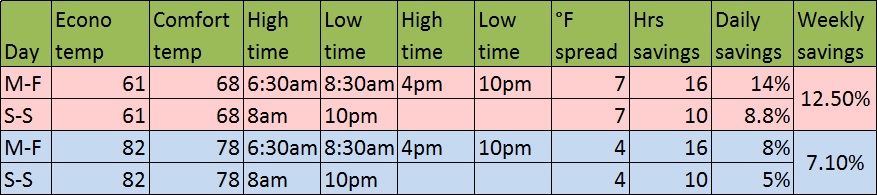
Of course, you can save even more if you are willing to lower either the comfort temperature or energy saving temperature for heating, or raise them for cooling, and again you’ll save more by extending the number of hours the energy-saving setting is on. One great thing about programmable thermostats as home energy saving devices is that you can set this all up, and never have to think about it again. The other is that you can easily tweak the program after a few weeks, to try to get even more savings and see if you are still comfortable.
Standby savers
Electronic appliances with a remote control power-on feature, such as a television, stereo, or DVD player, are constantly waiting for you to turn them on, and they’re constantly using a small amount of energy. Some devices, such as TVs with an instant-on feature, are constantly using a somewhat larger amount of energy, keeping themselves warm so that when you turn them on the screen can light up to full brightness instantly. This is not a particularly good use of energy; as I explain in How to save electricity, you can cut the cost on these devices by simply unplugging them, or putting them on a power bar and switching off the power bar, when the devices are not in use. But while this kind of inconvenience doesn’t bother me in the least, some people aren’t willing to put that kind of effort into saving energy, but would save energy if it was easier.
Standby savers are home energy saving devices that prevent this waste from occurring. Remote controled standby savers work as follows:
- You plug the standby saver into the wall socket, and plug the device that goes into standby mode into the standby saver.
- The standby saver detects when the current draw from the device drops to a low level, considered the standby level for the device. It cuts power completely to the device. The standby saver draws less than one watt of power itself (often as low as 0.2 watt) so its power consumption over an entire year is only 2 to 9 kilowatt hours.
- When you push the power-on button on the remote control, the standby saver detects the infrared signal from the remote control, and turns full power back on. Your device is now ready to receive the power-on signal. Press power-on again and the device turns on.
This sounds great, doesn’t it? The only drawback is you’ll have to push the remote control twice instead of once, or maybe three or four times, if the standby saver is sluggish.
Now if you ask me, this $25 to $50 investment is not the most cost-effective way to save energy. Chances are you have two sets of devices that this will work for: your home entertainment center (television set and DVD player) being one set, and your stereo system being the other. Is it really that much harder to put a $5 power bar into a wall socket and plug your TV and DVD player, or stereo equipment, into that, than to push the remote? You’ll save $20 to $45, which you can put towards CFLs or your upgrade-the-fridge fund. All in all, a convenient investment but not top of my list.
Smart Strip Power Bar computer standby detectors
A more impressive device to me is the Smart Strip power strip.This device looks like a color-coded power bar. Individual plugs fall into three categories: a control outlet, one or more constant hot outlets, and one or more switched outlets.You plug your computer into the control outlet. This outlet is continually monitored by the Smart Strip controller, and power is continually fed to it. When the controller detects that power to the compuer has been cut because the computer has been powered off, it cuts power to the switched outlets. When power begins to flow through the control outlet, power is restored to the switched outlets.
You would normally plug your desktop computer into the control outlet, and your peripherals into the switched outlets. If you have both a laptop and a desktop, you might plug in the cable modem and router power supplies to the constant hot outlets, so that devices connected to the desktop unit, such as printer, speakers, backup drive and so on are powered off when the computer is powered off. The modem and router would continue to operate for the benefit of the laptop (but if you leave them running and you’re not actually using them, you’re partly defeating the purpose of the Smart Strip!).
This home energy saving device is useful for people who need the added benefits of surge protection for electrical connections, fax, modem, and coax cables. But as with the standby savers, I don’t see the need to spend $30 to $50 on one of these if you can get by with a simple power bar with surge protection for $5. Unless you’re keen on gadgets or can never remember to power off the power bar when you turn off the computer, I suggest you save your money for more cost effective energy saving tools.
Thermal electrical switches
Another home energy saving device is a thermal electrical switch (a popular brand is Thermo Cube). These attach to a standard North American electrical outlet and provide automatic power-on / power-off capabilities within a given temperature range. Available configurations are:
The applications for thermostatic outlets include:
- Car block heaters and battery heaters can be attached to a programmable or low-temperature outlet so that the engine block or battery is warmed when the temperature falls below the minimum. This saves energy because you don’t have to run the block or battery heater all night in preparation for a morning drive, if outdoor temperatures are high enough that it isn’t needed.
- Pond de-icers and lake bubblers can be attached to an outlet so that ice is kept off the pond when the temperature drops, but no energy is wasted when the air temperature is just below freezing, or above freezing, since the lake or pond is unlikely to freeze above this temperature.
- Home and barn fans can be activated with programmable units, to keep rooms or animal quarters cool in hot weather, without running fans when not needed.
- Temperature-controled outlets can be used to activate an alarm or strobe light to indicate an over-temperature condition, allowing you to react appropriately without the need for expensive cooling equipment.
Air conditioner energy saving devices
You may be able to turn your existing residential air conditioning unit into a more energy saving air conditioner using a controller such as the Aircon energy saver, a small device you can install yourself, or have installed by your air conditioning contractor. These devices keep track of thermodynamic saturation in your cooling coils, and turn the compressor off at saturation (the point at which any further cooling of the coils will not affect the temperature change in the air being blown over the coils). For a more detailed explanation see the Aircosaver section on my Residential air conditioning unit page.
Another way to save on air conditioning is with an air conditioner mister, which involves misting tiny amounts of water around a central air conditioner’s condenser unit to cool the air down around it, making it substantially more efficient for pennies worth of water a day.
Bogus or questionable home energy saving devices
You may have seen online or television ads for an energy saving box, a device that claims to cut your electricity bill by 10% or 25% or 30% without you having to change any of your appliances, or a device that claims to cut your refrigerator electricity use by 25%. Read the claims for these devices carefully. While the people selling these devices are not lying, they may be using misleading terms, or omitting key details, in order to make the savings seem bigger than they really are. Let’s look at each type of home energy saving device in turn.
Cut your electricity bill by 10% or 25%: Some companies sell a device that costs up to $600 US, and that is supposed to dramatically cut your electricity bill. They claim no installation is required; one unit can just be plugged into a wall socket, another attaches easily to your circuit breaker panel. They also claim their device will extend the life of your motors. Let’s look at the reality behind these devices. I’m no electrical engineer; what’s below is just my layperson’s interpretation!
There is a built-in inaccuracy in the way electricity consumption is measured at your power meter. For inductive motors only, the result of this inaccuracy of measurement is that you wind up getting billed for somewhat more electricity than the motor actually uses. These home energy saving devices designed to save money on your electricity bill use a capacitor to correct for this inaccuracy, so that your electrical bill more truly reflects the electricity you actually used.
However, these devices only affect your energy bill, they do not save you any energy. If you are trying to save energy because you want to cut your carbon footprint, for example, these devices will have no effect whatsoever. The only thing they might save you is money, and the amount they save is questionable.
These devices only work on inductive motors that do not have their own capacitor. Because most larger, more modern motors already have a built-in capacitor, there is no savings on your electricity bill for such motors. Because lighting and heating uses of electricity are resistance loads, not inductive loads, there is also no savings for these devices. The only savings you are likely to experience are for inductive loads (motors) that do not have a built-in capacitor, such as fans or the motors on small apliances. As a result, while you might cut the amount of money you pay to power a blender or a fan by 25%, the total effect on your electricity bill is likely to be quite small. And remember, you are not saving one watt-hour of energy, just money.
Most of the companies selling these devices offer a free money-back guarantee if you haven’t experienced savings within 30 days, or 90 days. I suspect that they can make money off their product even if half or more of the buyers return the device within the guarantee period. With just a few customers who procrastinate, or don’t bother to check their savings, or who are willing to live with the 2-10% savings on their electricity bill rather than advertised rates of up to 25%, or who notice their bills drop 10% or more when the drop may just be random or seasonable variation, these companies can still make money.
Look carefully at the promotional material for these devices. Do they actually claim you will save electricity, or save energy? Or only that they will cut your electricity bill? What rate of reduction do they guarantee, as opposed to merely suggest? Read their literature carefully. If it sounds too good to be true, it probably is.
Cut your refrigerator energy use by up to 20%. Devices such as the Savaplug are advertised to cut energy use on your refrigerator. Here’s how they work. When the thermostat for your refrigerator detacts that it is time to start a cooling cycle, the compressor motor starts up. It takes a large amount of power to start the motor up and start the refrigerant flowing through the compressor. But once the refrigerant is flowing properly, less power is required. These devices detect when the initial burst of power is over, and reduce the flow of electricity to the refrigerator while the compressor is running. The assumption is that this saves you energy.
This sounds so simple that you have to wonder why the refrigerator companies haven’t figured it out. And, as it turns out, they have. Because refrigerators are subject to ever stricter energy efficiency requirements (with standards tightening every few years in North America and the EU, for example), they look for every energy savings they can get. And if a manufacturer could make their refrigerator 25% more efficient by installing a device that does the same thing as the Savaplug inside the refrigerator, and thereby achieve an ENERGY STAR rating (or at least keep up with the tightening requirements), do you think they would pass up the chance? Of course not. That’s why these devices sell with a disclaimer such as:
“…makes typical savings of 20% when fitted, and is particularly effective on larger and older models.”
Note that no guarantee of savings is made. And how did they measure typical?
So be wary of these devices. Ask the seller or manufacturer if they will guarantee a certain improvement for your refrigerator. Of course, if you have a fridge that is 10 years old or older, it might be worth buying one; the device might well pay for itself within a year. But refrigerators have gotten so much more energy efficient in the past ten years, that an entire new refrigerator can pay for itself in not too many years, so why not upgrade the refrigerator instead?
I had purchased one for refrigerator at home, but prior to use discovered that, in the event of power failure, the unit I purchased would need a reset. I realize it may have only been the model I had, but it was an expensive lesson from my employer as a temporary outage on a Friday night left the refrigerator/freezer off for the weekend. What a mess – everything defrosted and spoiled, and getting rid of the odor in the refrigerator resulted in replacement of the appliance. Decided then and there simply wasn’t worth it – what if I was on vacation or out of town!
I assume you’re referring to a power meter? I have not seen any that require a reset after a power failure in order for the connected appliances to receive power. That is definitely poor engineering. What brand/model was it?